
What We Do
The Media Center is a broadcast-quality HD production and post-production facility that can accommodate both in-studio and on-location productions.
State-of-the-Art Media Production Facilities
Broadcast-Quality TV Studio
The Media Center features a state-of-the-art HD television studio equipped with three Hitachi Z-HD6000 HDTV cameras, a JonyJib with a Panasonic 4K Professional Camcorder, computerized lighting, a Panasonic HD video switcher, a CueScript teleprompter, a professional audio board, a dedicated green screen, and a voice-over recording booth.
Professional Production Capabilities
Designed for both in-studio and on-location productions, the facility supports the recording of talk shows, interviews, instructional programming, and other broadcast-quality content using industry-standard equipment and digital workflows.
Post-Production & Digital Media Labs
Dedicated editing laboratories provide students with hands-on experience in digital video and audio editing, as well as computer graphics, motion graphics, and animation, preparing them for careers in today's media industry.
Meet Television and Film students from the Media Center
Produced by Gregory Bogart and students in the Television and Film Program at St. John's University’s Collins College of Professional Studies, this project showcases the creativity, collaboration, and hands-on learning that prepare our students for careers in the media industry.
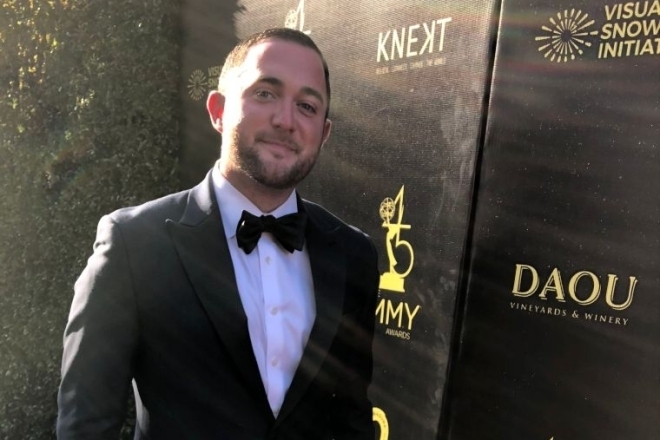
Emmy® Winner’s Life Came into Focus at St. John’s
From the moment he first visited, there was something “cinematic” about the St. John’s University campus, according to Hollywood producer Glenn Milley ’09CCPS. Set in the heart of multicultural Queens, NY, the University’s 100-plus acres laid out like an “oasis” in front of the prospective Communication Arts student.
A Look Inside Our Media Center
Additional Information
Media Center
 Carolyn Rutigliano '01 |
 Rich Martinez '01 |
Forms
Television Center Equipment Checkout Guidelines, Procedures and Penalties Summary
*This handout is for use only as a guideline in signing out equipment from the TV Center. Please refer to the complete version available in the Production Office, Marillac Hall Room 411, for full details.
Carolyn Rutigliano, Associate Production Manager:
(718) 990-7477, [email protected]
Dennis Vernaleo, Mass Communication Technology Coordinator:
(718) 990-2347, [email protected]
**ALL EQUIPMENT MUST BE RETURNED IMMEDIATELY IN THE EVENT OF A UNIVERSITY CLOSURE.**
Media Center Equipment Checkout Guidelines, Procedures and Penalties Summary
Click here for a link to the PDF.
Section I
Guidelines and Procedures
Click here for a PDF version of
A student must complete an equipment request form via Formstack and submit it to his/her professor. The professor's approval of the request verifies that the student is using the equipment for a class project and is qualified to use the requested equipment.
Blackmagic URSA Mini Pro Cameras
The Blackmagic URSA Mini Pro cameras are to be signed out using ONLY the designated sign-out form for that camera. Only students who have been taught how to use this camera and have been certified by a qualified professor can sign it out. You must indicate on the form which professor taught it to you, and the semester you learned it. Failure to do so will automatically nullify your request.
There are no exceptions.
*Note to Professors
-Do not sign a blank equipment request form. All information must be filled in.
2. The TV Center requires approval from a professor at least two days prior to the requested check-out date. Students will not be allowed to check out equipment on the day they are handing in their
request form.
At this time, the TV Center will NOT be accepting physical forms. All requests must be made via email.
3. If a student does not pick up equipment on the day they have requested it, their request form becomes void. A new form must be signed by a professor and submitted within the proper timeframe.
4. All equipment will be reserved for students (in an approved TVF/COM class) on a first-come, first-served basis.
5. The student is authorized to sign out only the equipment checked or noted on the request form that they are qualified to use and only on the specific date that is noted.
6. Equipment check-out times and check-in times are dependent on classes and the need for equipment in those classes. Check out/in times will vary by semester and may also vary by the equipment requested.
• Check out - 9:30am-2:00pm Monday - Friday
• Check-in - 9:30am-12:00pm Monday -Friday
7. A student may take out equipment for up to 2 nights maximum during the week and 4 nights maximum over a weekend.
*There is no certainty or guarantee that the equipment will be available for the maximum amount of time.
8. The student assumes all responsibility for the safety and proper usage of the equipment signed out to them.
-The student is responsible for reporting any malfunctioning equipment or damaged equipment as soon as the damage/malfunction is noted. Return it to the TV Center and report it in person.
9. Equipment may be taken off campus, but the student is responsible for returning the equipment in the same condition it left the TV Center, at or before the time noted on the sign-out sheet, under all circumstances. Violations are subject to disciplinary action and fees (see section II).
10. Digital Voice Recorders for radio production classes may be taken out for a maximum of 1 week with the class Professor’s approval and a properly filled-out form.
Section II: Disciplinary Action for equipment brought in late, damaged, or stolen.
If equipment is brought in late:
A fee of $75.00 per day will be charged through the Bursar to the student for late equipment returns.
A fee of $150.00 per day will be charged through the Bursar to the student for late Blackmagic URSA Mini Pro equipment returns.
*All fees must be paid in full before the student may use equipment and facilities again. A receipt from the Bursar will be required.
*Continued lateness will result in suspension of equipment privileges.
If equipment is brought in damaged:
Students will be liable for all costs of repairing or replacing damaged equipment. This will be charged through the Bursar to the student.
*Continued damage to equipment will result in suspension of equipment privileges.
If equipment is lost or stolen:
Students will be liable for all costs associated with replacing lost or stolen equipment. This will be charged through the Bursar to the student. Along with this monetary charge, the following disciplinary action will also be taken:
1st Offense: Late fee/replacement fee
2nd Offense: Late fee/replacement fee and suspension of equipment privileges for the semester
3rd Offense: Late fee/replacement fee and revocation of equipment privileges.
*Any suspicion of criminal activity or theft in relation to university equipment will be referred to public safety and/or civil authorities as deemed necessary.
**Your signature on the equipment request form and reservation sheet indicates that you have read, understand, and will abide by all these rules and that you were given all equipment in working order.
Equipment
Hitachi Z-HD6000 HDTV Studio Cameras
Cartoni P90 pedestals
Soundcraft Si1 audio console
ChyronHego MX character generator with Lyric X software
CueScript teleprompter
Panasonic AV-HS6000 2ME live production switcher
Blackmagic Hyperdeck Studio player-recorders
Panasonic AG-UX180 4K Premium Professional Camcorder (JIB Camera)
Software
Avid ProTools
Adobe Premiere
Adobe Creative Cloud
Remote Productions
Nikon D7100 DSLR cameras
Panasonic AG-AC90 Camcorder
Sennheiser & Sony microphones
Tascam audio recorders
Dracast LED light kits
Panasonic DVX200 camera
Blackmagic URSA Mini 4.6K camera
Zeiss lenses
Click on the names below, to read more about our alumni sucess stories as they share their experiences at St. John's.
Stefany Steinman-Nonnenmacher '95SVC
Click here for more CCPS Related News